How to Analyse SERPs
SERP analysis is a must-do if you want to create content that actually ranks. By analysing what’s ranking you’re taking an actionable step to understand search intent, what Google is prioritising and how your writers can earn page 1 ranks.
But what exactly is SERP analysis and how do you do it?
In this article, read about:
- What is SERP Analysis?
- How to analyse search results before creating your content
- A step-by-step guide for conducting SERP analysis
- SERP features explained
- Tools to help earn that page one rank
What is SERP analysis?
SERP analysis, meaning Search Engine Results Page analysis, is the process of reviewing what’s ranking for desired keywords. The process includes evaluating the types of content and sites that Google is ranking in the top spots and further investigation into what exactly those pages, your competitors, are doing to earn visibility.
How to analyse search results before creating your content
SERP analysis starts with a search of the keyword you want to rank for. Once you’ve done that you can take your analysis a step further by looking closely at top-ranking articles. Through SERP analysis you can determine:
- What content Google is ranking and therefore the type of content you need to create
- Whether or not your site ‘deserves’ a rank for the keyword
- Keyword relevancy to your site
- How to cluster keywords to rank
- Tools to help earn that page one rank
A step-by-step guide for conducting SERP analysis
If you want your content to rank highly on Google, it’s important to understand how to analyse search engine results pages (SERPs). This process can help you understand what kind of content is ranking well for your target keywords, and also give insight into what features are being used by the top-ranking pages. Here’s a step-by-step guide to conducting SERP analysis:
Identify your target keywords
Make a list of the keywords you want to rank for, and also consider related terms that you could target.
Examine the top-ranking pages
Enter your terms into Google search and take note of the page titles and types of pages ranking. Does it look like a SERP that you can see your site ranking within?
Analyse the content of the top-ranking pages.
Go a step further and open up ranking pages.
What topics are they covering? What types of headings are included? Are they using videos or images?
Your findings are all indicators of the types of content you need to create in order to rank.
Do yourself a favour and do this manually; you just can’t beat human insights in an SEO analysis, especially when it comes to content.
Check for SERP features
Are there featured snippets, knowledge panels or People Also Ask placements being displayed?
You can create content in a way that helps your site rank. (More on SERP features below.)
Find out what else your competitors are ranking for
If you’ve got access to tools like Ahrefs or SEMrush, copy the URL of ranking pieces and take a look at them. Focus on keywords they’re ranking for in positions 1-16. This might help you identify more keywords that you can cover within your article to improve chances of ranking.
Evaluate your own content
Next, you’ll want to take a close look at your content against the findings from your SERP analysis.
Ask yourself, honestly, is your content as good as, or rather – better – than the top-ranking pages? If not, what changes could you make to improve it.
Consider schema
Consider what lovely schema you can add to throw some nice juicy data at Google! Especially useful if you’re embedding video or answering those FAQs.
By conducting SERP analysis on a regular basis, you can keep track of the latest trends and ensure that your content is always optimised to rank well on Google.
SERP features explained
Featured Snippet
A featured snippet is a summary of an answer to a question that is displayed on the SERP. This summary is taken from the content of a web page.

The aim of featured snippets is to give users quick and easy access to information so that they can get the answer to their questions without having to click through to a website. Google pulls the information for featured snippets from web pages that it deems to be authoritative and relevant.
To increase the chances of your content being selected as a featured snippet, make sure that your content is well-written and informative. You should also include questions and answers in your content so that Google can easily identify it as being relevant to featured snippets.
Paid Ads
Paid ads are displayed on the SERP in order to promote a product or service. These ads are paid for by businesses and appear above the organic results for a search query. Paid ads are a form of online advertising and can be an effective way to increase traffic to your website.
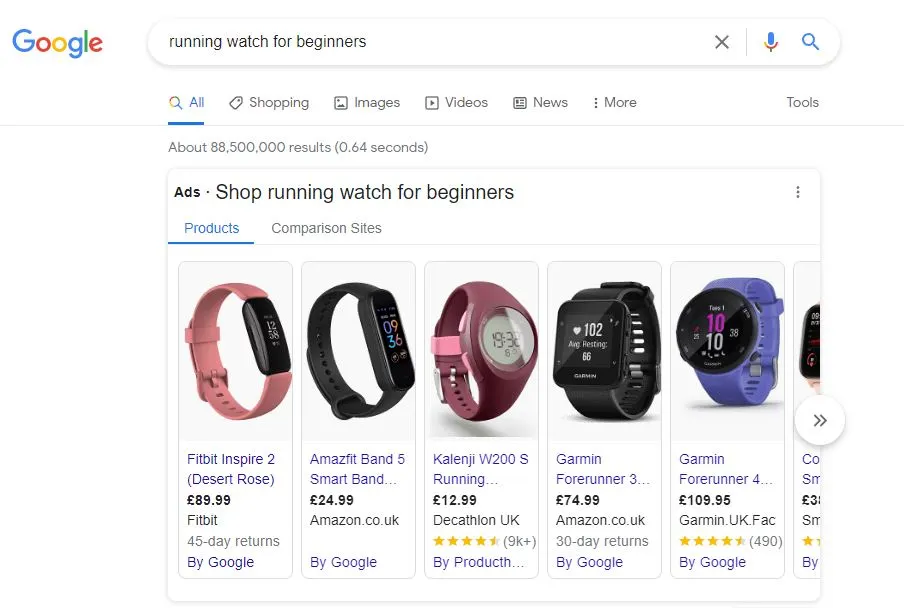
In order to create a paid ad, businesses need to set up an account with Google AdWords. Once you have created an account, you can then create your ad and choose the keywords that you want to target. Your ad will then be displayed on the SERP whenever someone searches for one of your targeted keywords. Paid ads are a great way to increase visibility for your business and reach new customers.
Organic Results
Organic results are the unpaid results that are displayed on the SERP. Those are the ranks you’re earning with SEO.

These results are based on the relevancy of the content to the search query. In order to rank high in the organic results, businesses need to create high-quality, relevant content. This content needs to be optimised for the relevant keywords so that it appears when people search for those keywords. The higher your ranking in the organic results, the more likely you are to earn traffic to your website.
Local Pack
The local pack is a feature of the SERP that displays a list of businesses that are relevant to the search. Think local searches, like ‘restaurant near me’ or ‘plumber in <area>’.
You’ll likely be familiar with the map in Google SERPs.
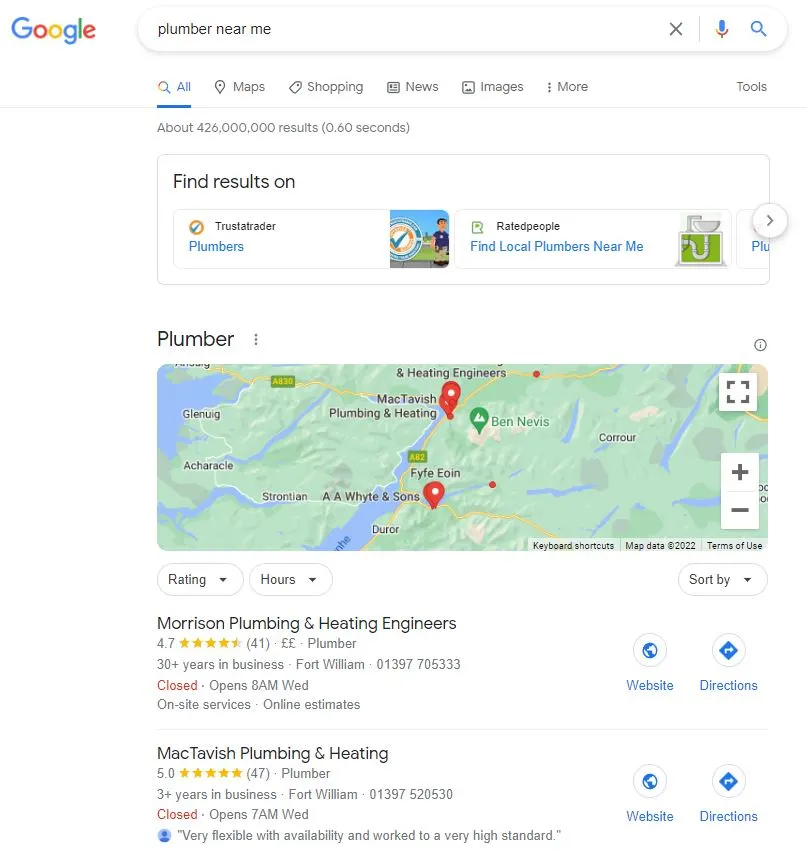
This list includes the business name, address, phone number, and website. The businesses that are displayed in the local pack are those that have claimed their listing on Google.
For brick and mortar stores, set up a Google Business Profile and earn reviews there to increase your chances or ranking.
Image Pack
The image pack is one of the most common features of Google SERPs. It displays images that are relevant to the search.

These images are from website pages. The website pages have an image embedded and are likely using the search terms in the file name of alt text.
The image pack is a great way to increase the visibility of your website and attract new visitors. Sometimes images appear in the pack, at pictured above, othertimes they can be found within the image section of Google.
To increase your chances of appearing in images, optimise your file names. Instead of IMG5660 title your file with the keyword as long as it’s relevant to the image. Then, upload it to your site and write descriptive alt text. Where natural, include your keyword in the alt text.
Sitelinks
Sitelinks are links to other pages on your website that are displayed on the SERP beneath your website listing and can be a great way to increase traffic to your website.

In order to increase the chances of your website being given sitelinks, make sure that your website is well structured. Internal linking will help with this.
People Also Ask
The People Also Ask (PAA) feature is a trove of data! Within PAA you’ll find questions that users are searchig that are related to the search.

To rank within the PAA section try answering questions that appear for your desired keywords. Use the question within the question if you can.
Tools to help earn that page one rank
There are a number of different tools that can be used to help you improve your ranking on Google. These tools can help you to track your progress, understand the competition, and find new opportunities for keywords.
Here are some of the best SERP analysis tools that I use daily.
Google Search Console
Every site needs to have Google Search Console (GSC) set up.
Whilst you can’t analyse competitor pages with it you can look at your ranking pages, find some keywords that are on page 2 or 3, then use these keywords to start the SERP analysis process.
This is a free tool from Google and it is an absolute trove of data. GSC can be used to track your progress and understand your position in the SERPs.
What is Google Search Console?
Google Search Console is a free web service that allows website owners to monitor their site’s performance in Google Search results, as well as diagnose potential issues that may be impacting their ranking.
The service provides information on things like the number of impressions and clicks your site is getting, the average position your site is appearing in, and the queries that people are using to find your site. Google Search Console can be an essential tool for understanding your site’s visibility on Google and making improvements to your ranking.
Outside of SERP analysis there are heaps of useful reports such as page experience and core web vitals, crawlibility, sitemaps and more, but that’s for another blog!
How to use Google Search Console
To use Google Search Console for SERP analysis and to improve your ranking, you need to first ensure that your website is registered and verified with the service.
Once you have done this, you can then start to look at the various reports (predominately performance/serach results). This report can be used to identify potential issues that may be affecting your ranking, such as low click-through rates or a high number of impressions but no clicks. Also, keywords ranking on the bottom of page one or top of page two.
By conducting SERP analysis and making improvements to pages that are underperforming, you can start to see an improvement in your ranking on Google.
Google Keyword Planner.
This tool can be used to find new keywords and understand how difficult it will be to rank for them.
Confession: I don’t love Google Keyword Planner and prefer SEMrush, however if you can’t afford to buy these tools, Keyword Planner is a brilliant start point.
What is Google Keyword Planner?
Google Keyword Planner is a free ads tool from Google. It is used to help research keywords for your website, for ads, however it can be used to help identify keywords for SEO, too.
You can use the Keyword Planner to find new keywords that are relevant to your business and see how difficult (in theory) it would be to rank for them in the SERPs.
The Keyword Planner can also be used to estimate the amount of traffic that a particular keyword could bring to your website, as well as the average cost-per-click for that keyword for ads purposes..
How to use Google keyword planner
To use the Keyword Planner, simply enter your keywords into the tool and Google will return a list of related keywords. Use this data to understand which keywords are most relevant to your business and have a realistic chance of ranking for.
Once you have identified some keywords that you would like to target you can undertake SERP analysis to make sure the search intent is fitting and that you might be able to rank.
SEMrush (or Ahrefs)
This is a paid, third-party tool that offers a free trial, and it provides plentiful data about the competition and keywords.
If you’re really thinking about taking SEO seriously I think you need either SEMrush or Ahrefs.
What is SEMrush?
SEMrush can be used to find new keywords, understand the competition, and track your progress. The tool also provides information on things like the average position your site is appearing in, the number of impressions and clicks your site is getting, and the queries that people are using to find your site.
SEMrush can be an essential tool for understanding your site’s visibility on Google and making improvements to your ranking.
How to use SEMrush
To use SEMrush for keyword research and SERP analysis enter you kreyword ideas into ‘keyword overview’ or ‘keyword magic’. SEMrush will return a list of related keywords.
You can then use this data to understand which keywords are most relevant to your business and have a realistic chance of ranking.
Once you have identified some keywords that you would like to target, you can then use SEMrush to estimate the traffic for those keywords. If you click into a keyword for a full overview, SEMrush even has some SERP insights such as who’s ranking now and how stable the ranks have been.
MozBar
I like to use this tool to see if a site I’m working on has a good chance of ranking for a certain keyword. It’s worth noting that domain authority isn’t everything, but there is a correlation! If you’re a brand new site with a DA of 6 it’s unlikely to rank in a SERP where the other pages are 80+.
What is MozBar
MozBar is a chrome extension allows you to see how Moz has understood a websites domain authority, page authority and spam score.
How to use MozBar?
All you need to do is log in to Moz and install the chrome extension. Toggle it on to get insights into competitor domain authority, page authority and spam score.